2026 UPSC OMR Sheet Filling Details | PDF Download
Download the official UPSC OMR sheet PDF format. Learn to fill Roll Numbers, Booklet Series, and Subject Codes correctly to avoid disqualification in Prelims.

Last updated

The Union Public Service Commission (UPSC) Preliminary examination relies entirely on Optical Mark Recognition (OMR) technology for evaluation. A single mistake in the Booklet Series or Roll Number leads to immediate disqualification. This happens no matter how much the candidate knows.
This guide defines the structural requirements of the UPSC OMR sheet and provides strict protocols for marking answers. PadhAI integrates these technical instructions to help aspirants standardize their practice sessions before the 2025 examination.
The UPSC OMR sheet is a special document. The system reads answers from candidates in the Civil Services Preliminary Exam. This sheet contains pre-printed fields for specific data entry and a matrix of bubbles for recording answers.
Scanners use light sensors to detect the absence of light reflection where a candidate marks a bubble. The machine ignores partially filled circles or faint marks made by pencils or gel pens. This automates the process and allows for no manual intervention or human correction of errors.
Join our WhatsApp Community
The OMR Sheet divides into two functional zones that require distinct encoding strategies.
1. Candidate Information Section
This upper portion records the aspirant's identity and exam specifics. It requires the manual writing of the Centre Name, Subject, and Roll Number in English or Hindi. Below the written Roll Number, candidates must darken the corresponding circles. A mismatch between the written number and the darkened circle renders the sheet invalid.
2. The Answer Marking Matrix
The lower portion consists of rows numbered 1 through 100 (for Paper I) or 1 through 80 (for CSAT). Each number matches a question in the Test Booklet. It has four options: A, B, C, and D. Candidates must find the correct option and fill in the circle completely.
Adhering to these protocols guarantees that the optical scanner reads the data correctly to avoid negative marking.
1. Use Only Black Ballpoint Pen
The Commission mandates the use of a Black Ballpoint Pen for all entries. Gel pens, ink pens, and pencils possess ink properties that scanners often fail to detect. The use of a pencil is strictly prohibited and leads to the rejection of the answer sheet.
2. Encode the Test Booklet Series Immediately
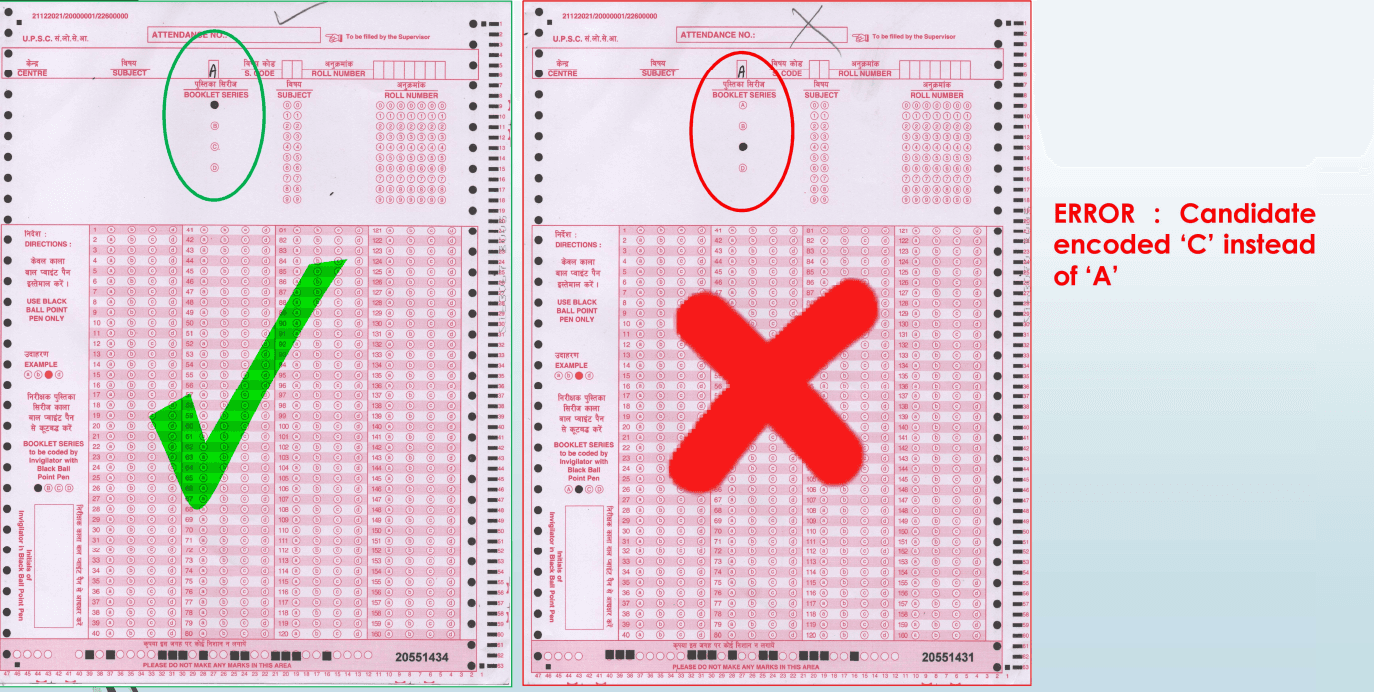
The Test Booklet Series (A, B, C, or D) acts as the cipher for the answer key. This error results in a score of zero or failure. Candidates must verify the series printed on their question paper and mark the identical letter on the OMR sheet.
3. Darken Bubbles Completely
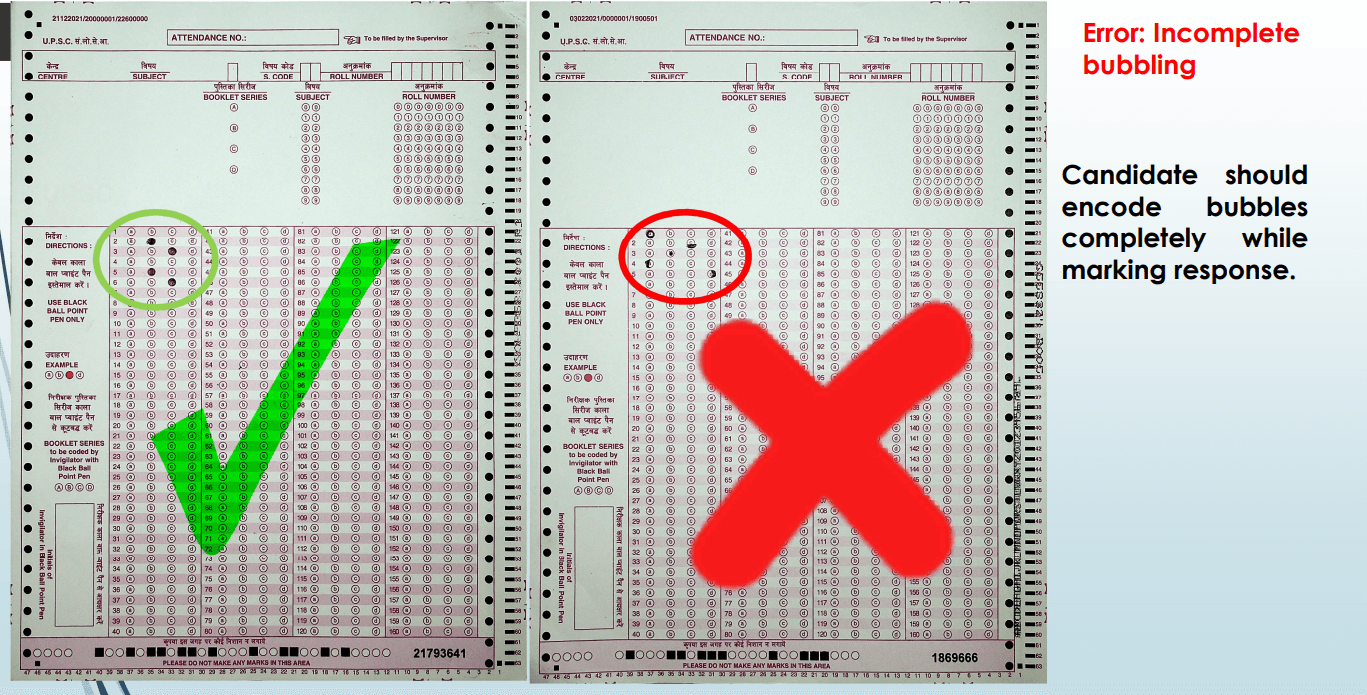
The scanner reads the density of the mark. Candidates must fill the entire circle without leaving white spaces inside the boundary. Marks such as ticks, crosses, or dots are unreadable by the OMR software.
4. Avoid Stray Marks and Folding
The OMR sheet contains timing tracks and alignment markers on the edges. Writing on the reverse side or making stray marks near the timing tracks confuses the scanner. Folding or mutilating the paper disrupts the physical feeding mechanism of the scanning device.
5. Never Mark Multiple Options
The system accepts only one response per question. Darkening two bubbles for a single question prompts the machine to treat the answer as incorrect. No marks are awarded for multiple mark questions even if one of the bubbles represents the right answer.
Add as a preferred Source on Google
No, the use of correction fluid (whitener) or blades to scratch out ink is prohibited. These substances alter the paper's thickness and surface reflectivity. Such alterations often cause the scanner to jam or misinterpret the data. Once someone makes a mark with a black ballpoint pen, it becomes permanent.
The Scannable Attendance List (SAL) serves as the official record of a candidate's presence. It links the candidate's identity to their specific Test Booklet Series.

Common SAL Mistakes to Avoid
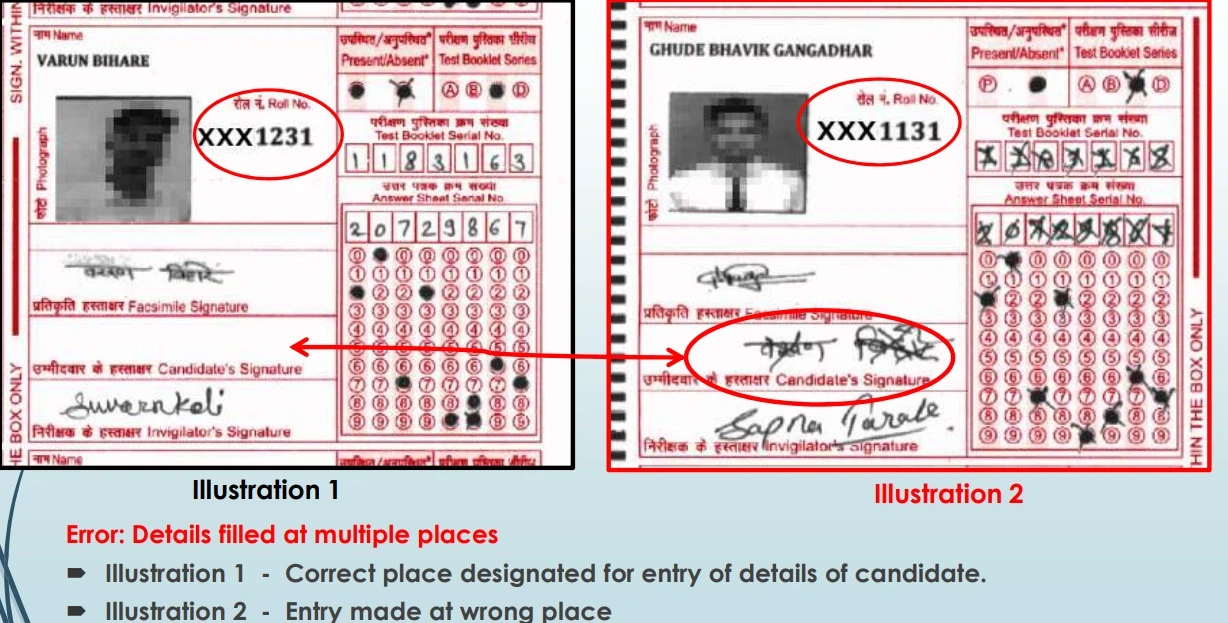
Wrong Marking of Presence: Candidates must mark the circle under the "Present" column. Marking the "Absent" column or the wrong row causes verification failures.
Incorrect Signature Placement: The signature must remain strictly within the designated box. Signing across the border or in the invigilator's space invalidates the entry.
Duplicate Entries: Filling details in multiple places on the SAL creates data conflicts during digital processing.
The UPSC releases specific data on why candidates fail the technical scrutiny of the OMR sheet.
Booklet Series Omission
Candidates frequently forget to encode the Booklet Series while focusing on the Roll Number. Without this series code, the computer lacks the reference logic to grade the paper.
Subject Code Mismatch
General Studies and CSAT papers possess unique subject codes (e.g., 02 for CSAT). Entering the wrong subject code leads to a mismatch between the answer key and the submitted sheet.
Prohibited Area Encroachment
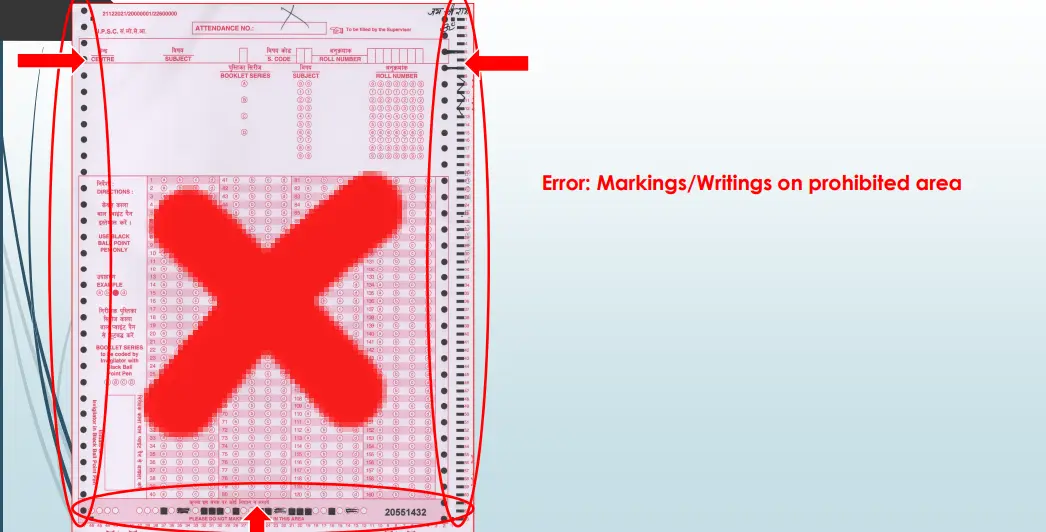
The OMR sheet contains specific "Do Not Write" zones. Candidates sometimes use these margins for rough work or calculations. Any writing in these prohibited zones triggers a rejection during the scanning phase.
Consistent practice with a physical OMR sheet builds muscle memory and reduces anxiety. PadhAI advises users to print sample OMR sheets and use them during full-length mock tests. This habit helps aspirants gauge the exact time required to bubble 100 questions, typically in 15 to 20 minutes. Integrating this manual task into the revision schedule aligns the biological clock with the demands of the actual exam day.
Frequently asked question (FAQs)
Will a mistake in the Booklet Series code disqualify my UPSC Prelims attempt?
Is it permissible to use a gel pen or pencil for darkening OMR circles?
How does the UPSC OMR system handle questions with multiple darkened bubbles?
Is rough work permitted on the margins of the OMR sheet?
Can correction fluid or blades fix a marking error on the sheet?
The UPSC OMR sheet demands the same level of precision as the syllabus itself. Candidates must utilize a black ballpoint pen, verify the Booklet Series, and maintain the physical integrity of the paper. PadhAI recommends downloading the sample PDF and practicing marking techniques to eliminate technical errors before the Prelims Examination.






No comments yet. Be the first to join the discussion!