UPSC Application Form 2026: Guide, Notification, Eligibility
The UPSC CSE 2026 application process starts Feb 4, 2026, with a deadline of Feb 24, 2026 (6:00 PM). Candidates must complete the mandatory One-Time Registration (OTR) and meet the eligibility criteria: a Bachelor's degree and age 21–32 (General). The Prelims exam is on May 24, 2026. Apply early and review all documents carefully.

Last updated
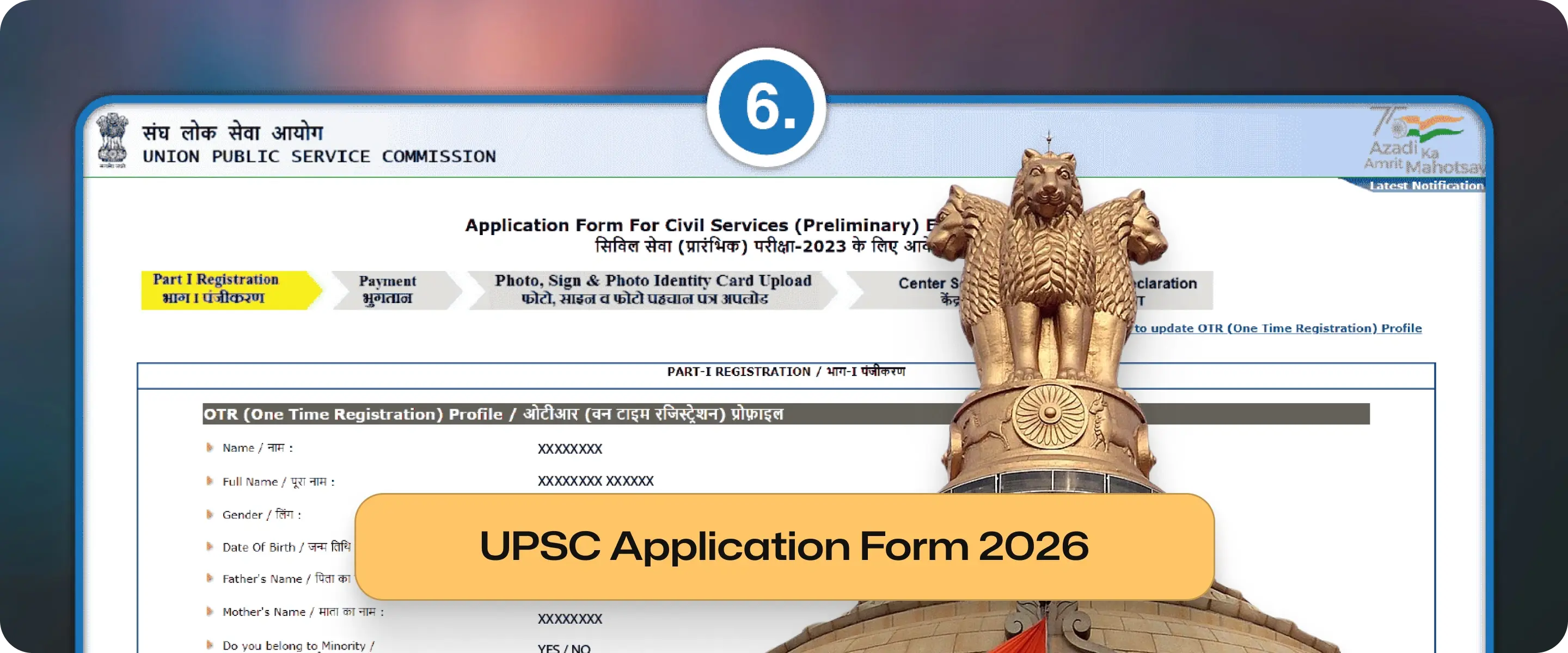
Key Highlights:
Form Release Date: The UPSC releases the official notification and application form on 4 February 2026.
Application Deadline: Candidates must submit the application by the final deadline of 27th February 2026 (6:00 PM).
Exam Dates: The Preliminary Exam occurs on 24 May 2026, and the Main Exam starts on 21 August 2026.
Eligibility Criteria: Aspirants must hold a Bachelor’s degree and meet the age requirement of 21–32 years (General category) as of 1 August 2026.
One Time Registration: All first-time applicants must first complete the One-Time Registration (OTR) on the UPSC online portal.
Application Form Fee Details: Male candidates in the General, OBC, and EWS categories pay a ₹100 application fee; UPSC exempts all female, SC/ST, and PwD candidates.
The UPSC Application Form 2026 is the first step for candidates taking the Civil Services Examination (CSE) 2026. The Union Public Service Commission runs this exam. Aspirants should check the UPSC notification for 2026. They need to know the exam date.
It is also important to understand how to fill out the application form. This will help them avoid mistakes.
This article provides clearand updated information on the UPSC application form for 2026. It includes official dates, eligibility criteria, fee structure, required documents, and a step-by-step guide for applying.
Join our WhatsApp Community

The UPSC Notification 2026 officially announces the Civil Services Examination cycle and governs the entire recruitment process. It contains details related to vacancies, eligibility, exam pattern, syllabus, and application rules.
UPSC Notification 2026 Release Date: 4 February 2026
Candidates should rely only on the notification and official instructions while filling the UPSC application form.
UPSC Notification 2026 Out
Event | Date |
UPSC Notification 2026 Release | 4 February 2026 |
Start Date | 4 February 2026 |
Last Date | 27th February 2026 (6:00 PM) |
Application Correction Window | As notified by UPSC |
Prelims Exam Date 2026 | 24 May 2026 |
Mains Exam Date 2026 | 21 August 2026 |
UPSC Interview / Personality Test | Feb–Mar 2027 |
Final Result Declaration | April 2027 |
Total Vacancies | To be notified |
Age Criteria | 21 to 32 years (relaxations for reserved categories) |
UPSC Application Form Official Website |
Add as a preferred Source on Google
Particulars | Details |
Exam Name | Civil Services Examination (CSE) 2026 |
Conducting Authority | Union Public Service Commission |
Application Mode | Online only |
Official Portal | upsconline.nic.in |
Exam Level | National |
Selection Stages | Prelims → Mains → Interview |
UPSC Application Form Stages | 1. One-Time Registration (OTR) / Part-I Registration 2. Detailed Application Form (DAF) for Prelims 3. DAF for Mains (after qualifying Prelims) 4. Interview Form (after qualifying Mains) |
Exam Frequency | Annual |
Candidates must keep the following documents ready before starting UPSC form fill up:
Document | Requirement |
Photograph | Recent, passport-size, as per UPSC specifications |
Signature | Scanned, clear, prescribed size |
Photo ID | Aadhaar / PAN / Voter ID |
Class 10 Certificate | Proof of Date of Birth |
Graduation Certificate | Degree / Provisional Certificate |
Category Certificate | SC/ST/OBC/EWS (if applicable) |
PwD Certificate | If applicable |
Important: Incorrect document format or size is one of the most common reasons for application rejection.
UPSC Eligibility Criteria
Age Limit (as on 1 August 2026)
Category | Minimum Age | Maximum Age |
General | 21 years | 32 years |
OBC | 21 years | 35 years |
SC/ST | 21 years | 37 years |
PwD | 21 years | 42 years |
Educational Qualification
Requirement | Details |
Minimum Qualification | Bachelor’s degree from a recognised university |
Final-Year Students | Eligible to apply |
Nationality Criteria
Service | Nationality Requirement |
IAS / IPS | Indian Citizen only |
Other Services | Indian citizens, Nepal/Bhutan nationals, Tibetan refugees (as per rules) |
Category | Application Fee |
General / OBC / EWS (Male) | ₹100 |
SC / ST | Exempted |
PwD | Exempted |
Female Candidates (All Categories) | Exempted |
Payment Modes:
Net Banking
Debit Card
Credit Card
SBI Challan
Follow the steps below to correctly fill the UPSC application form 2026:
Step 1: One-Time Registration (OTR)
1: Open Account Creation Page
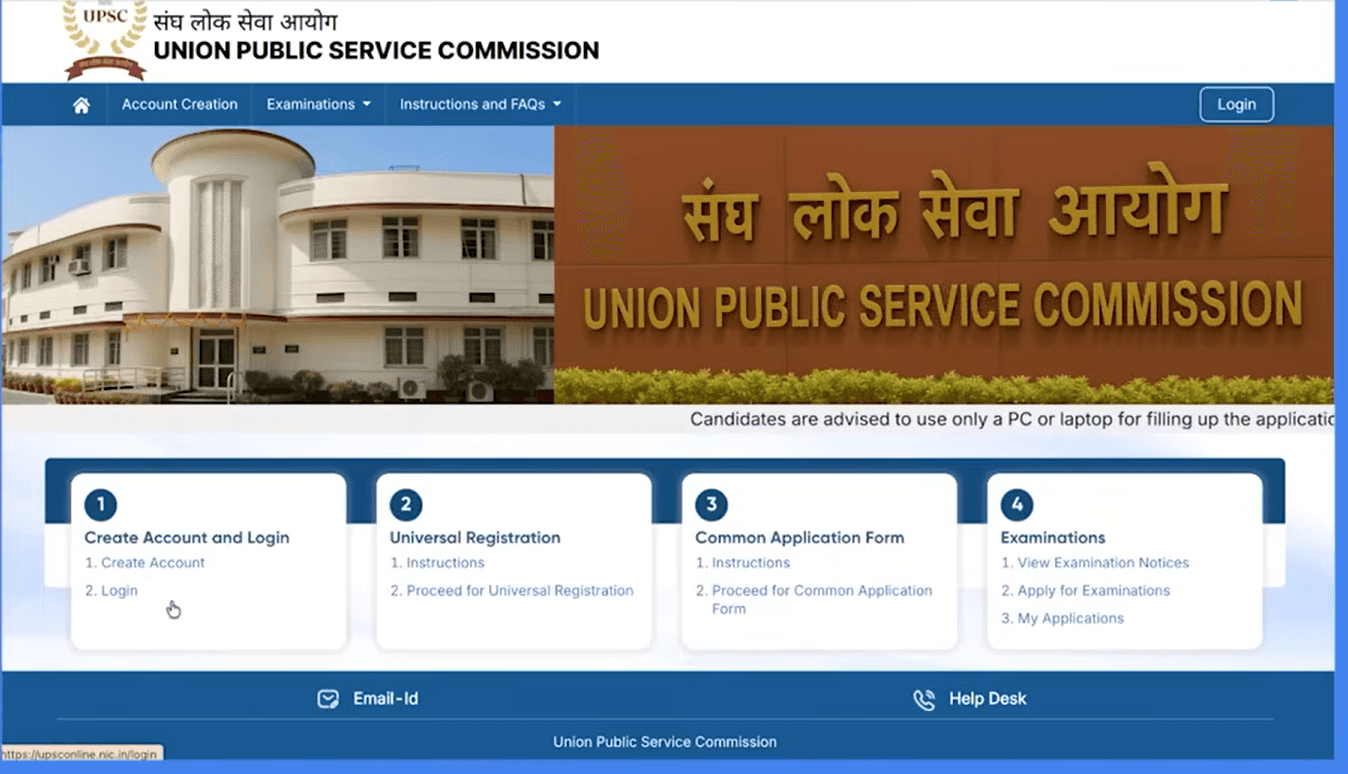
Visit the official UPSC website.
Click on Account Creation.
You will see a progress bar with four stages:
Instructions
Verify Email ID
Verify Mobile Number
Create Password
2: Read Instructions
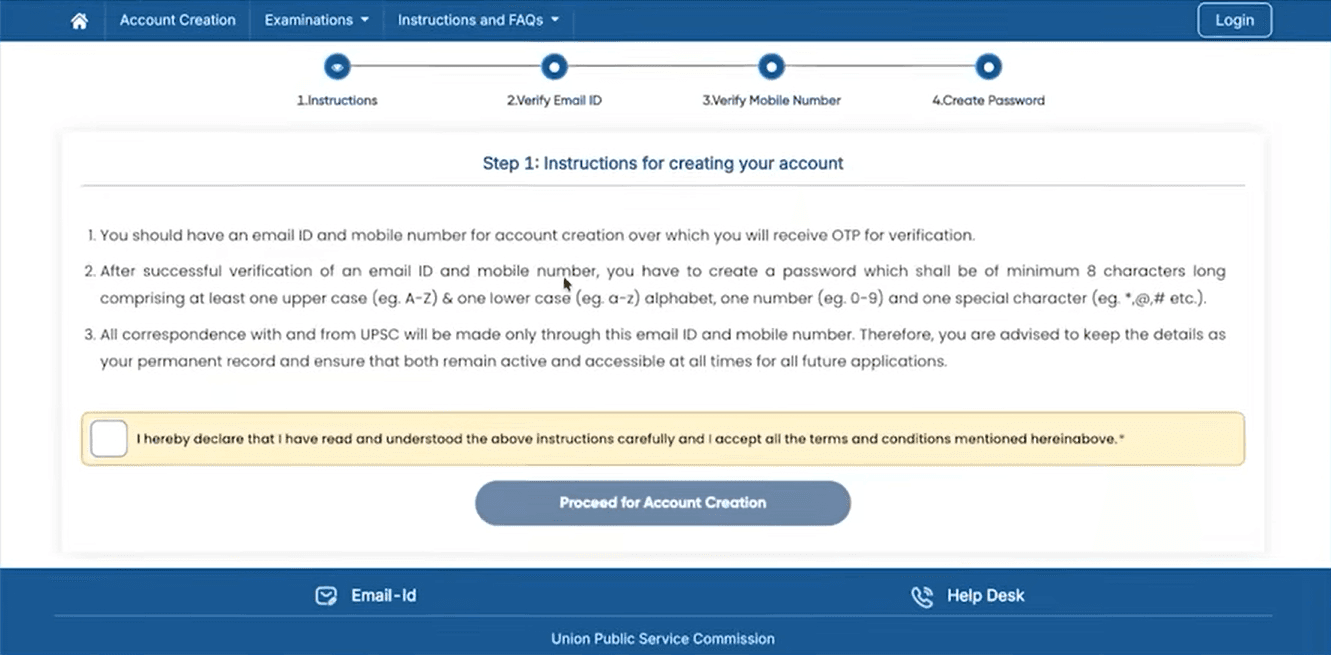
Carefully read the instructions displayed on the screen:
You must have a valid email ID and mobile number.
OTPs will be sent to both email and mobile for verification.
Password must be at least 8 characters, containing:
One uppercase letter (A–Z)
One lowercase letter (a–z)
One number (0–9)
One special character (@, #, $, etc.)
All future UPSC communication will be through this email and mobile number.
Tick the checkbox confirming that you have read and accepted the instructions.
Click Proceed for Account Creation.
3: Verify Email ID
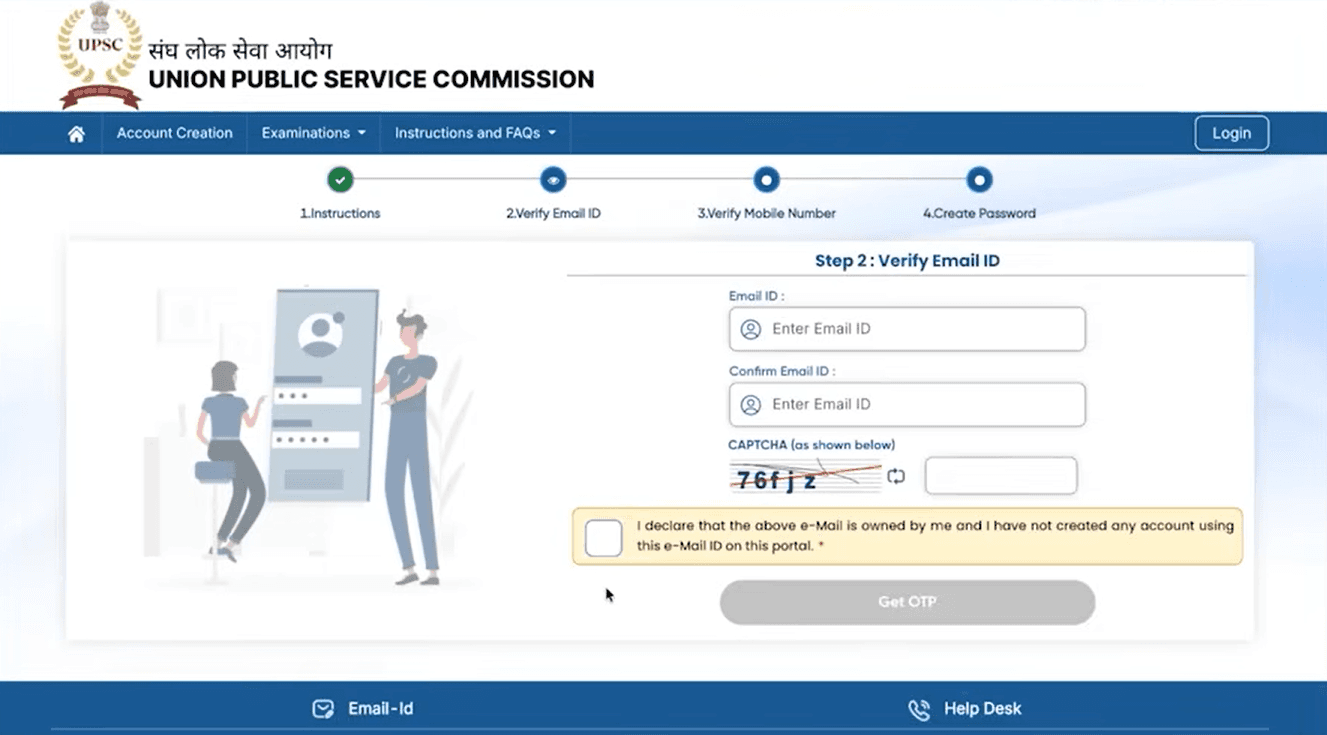
Enter your Email ID.
Re-enter the email ID in Confirm Email ID.
Enter the CAPTCHA shown on the screen.
Tick the declaration checkbox confirming ownership of the email ID.
Click Get OTP.
An OTP will be sent to your registered email ID.
Enter the OTP and click Verify Email.
A success message will appear: “Email ID verified successfully.”
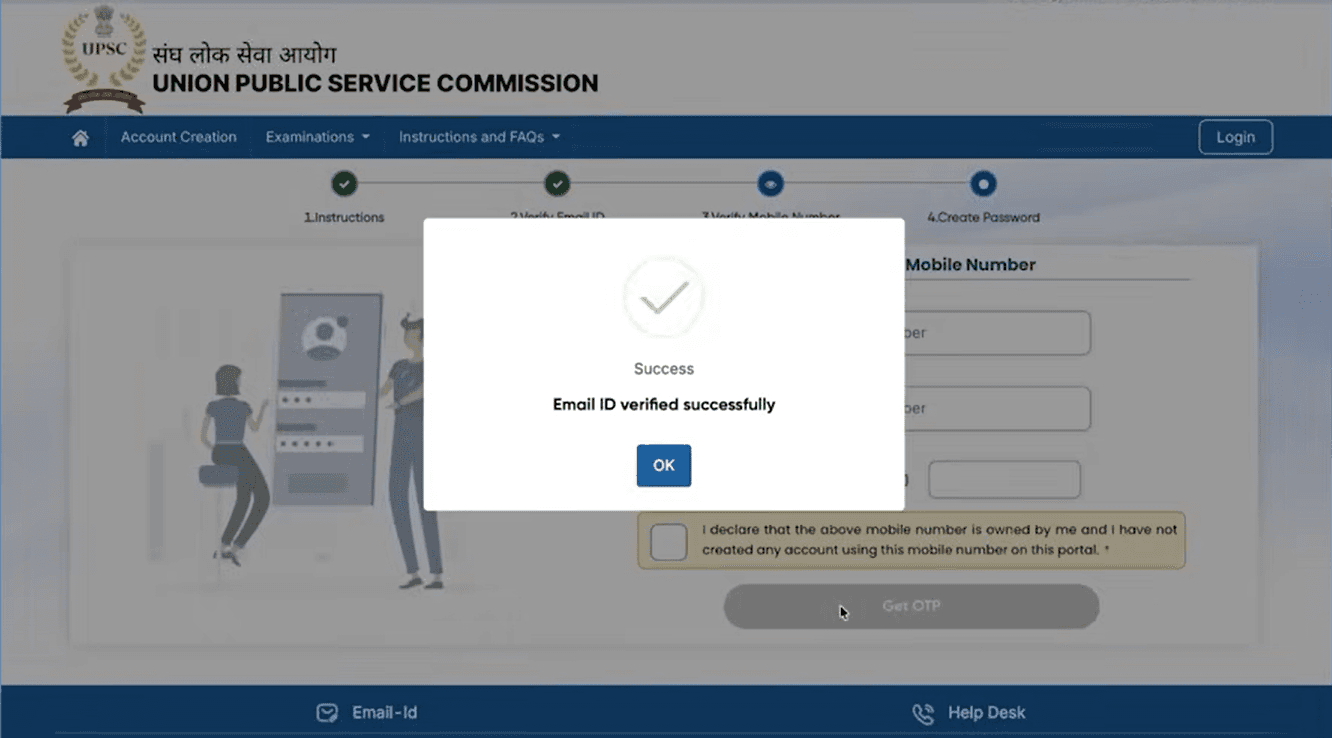
4: Verify Mobile Number
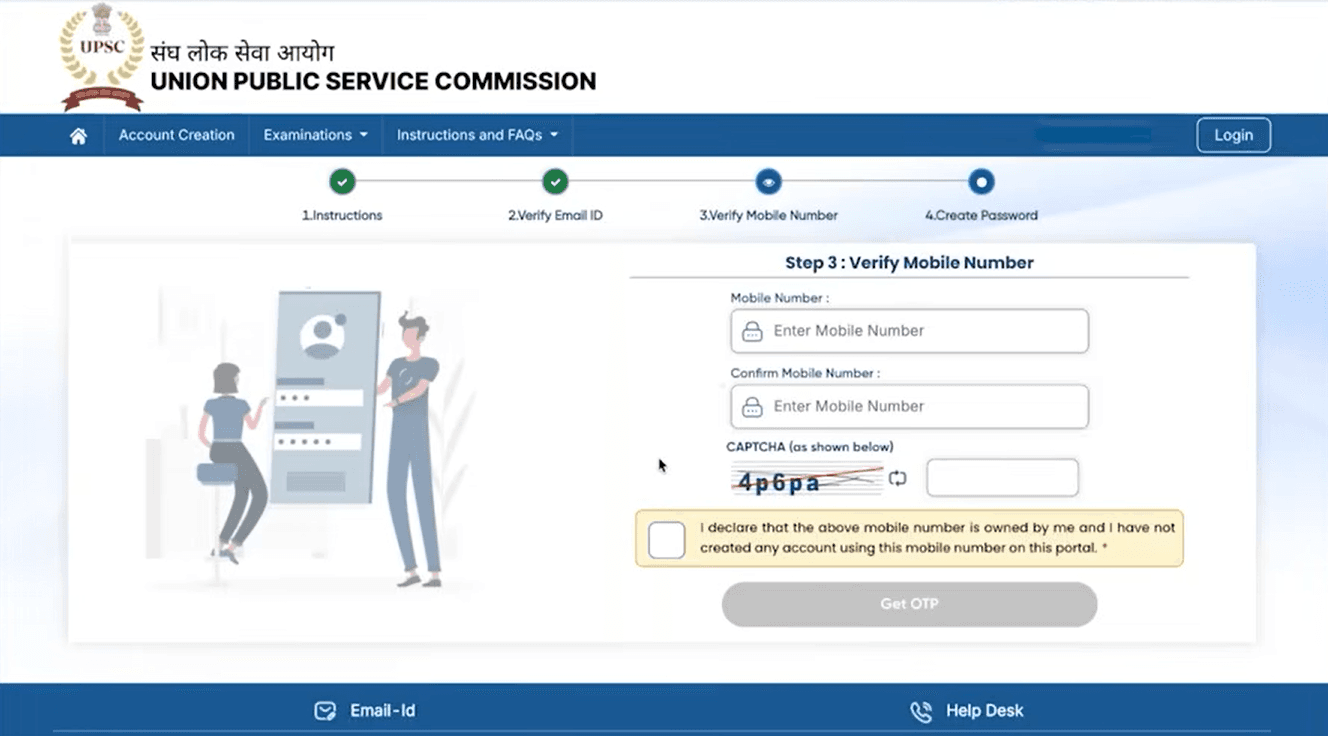
Enter your Mobile Number.
Re-enter the mobile number in Confirm Mobile Number.
Enter the CAPTCHA displayed.
Tick the declaration checkbox confirming ownership of the mobile number.
Click Get OTP.
An OTP will be sent to your registered mobile number.
Enter the OTP and click Verify Mobile Number.
A success message will appear: “Mobile number verified successfully.”
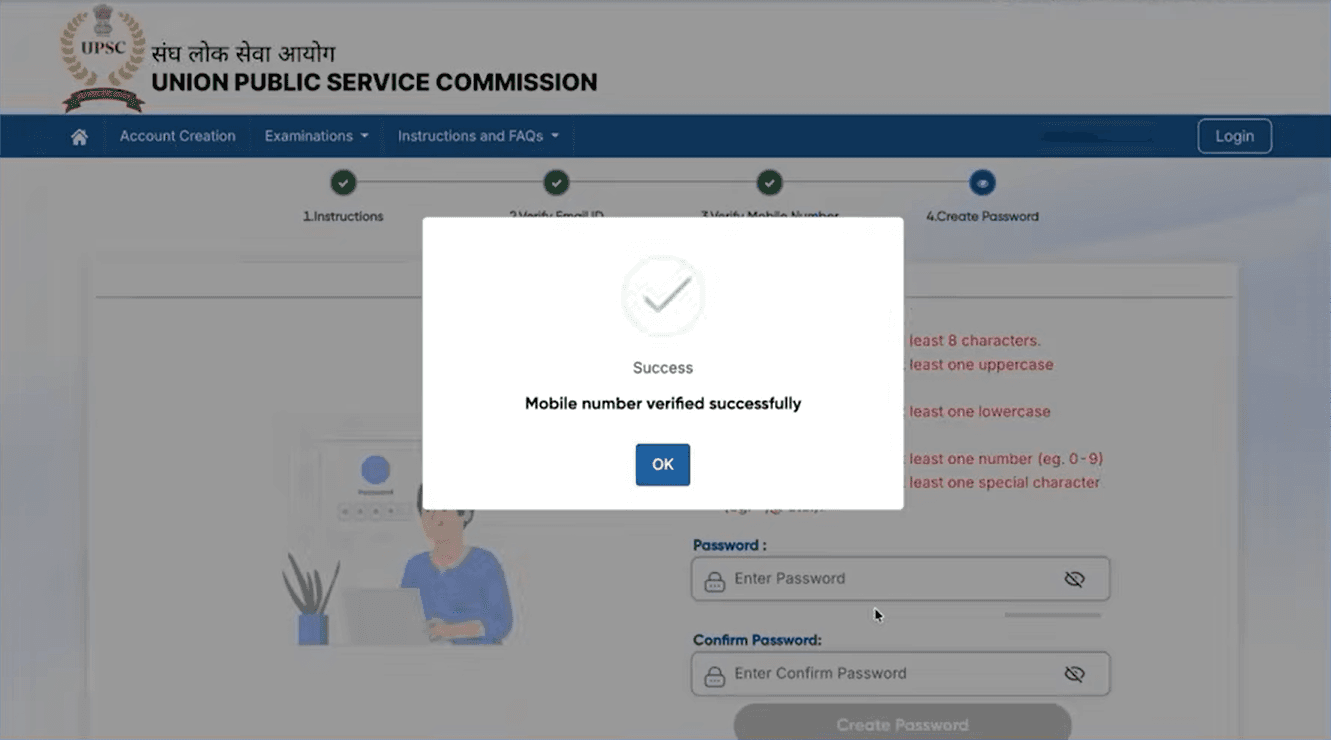
5: Create Password
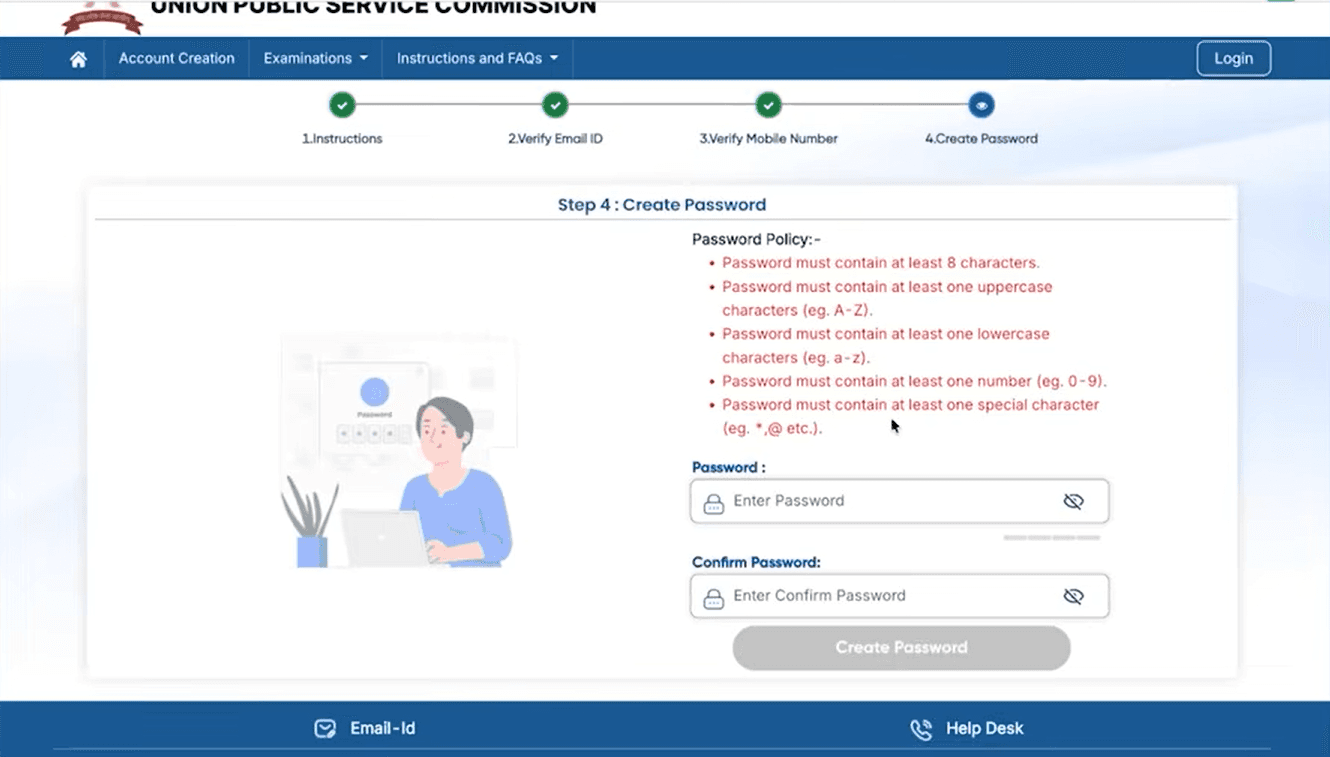
Create a password following the password policy:
Minimum 8 characters
At least one uppercase letter
At least one lowercase letter
At least one number
At least one special character
Enter the password in the Password field.
Re-enter the same password in the Confirm Password field.
Click Create Password.
6: Registration Successful
A confirmation message will appear:
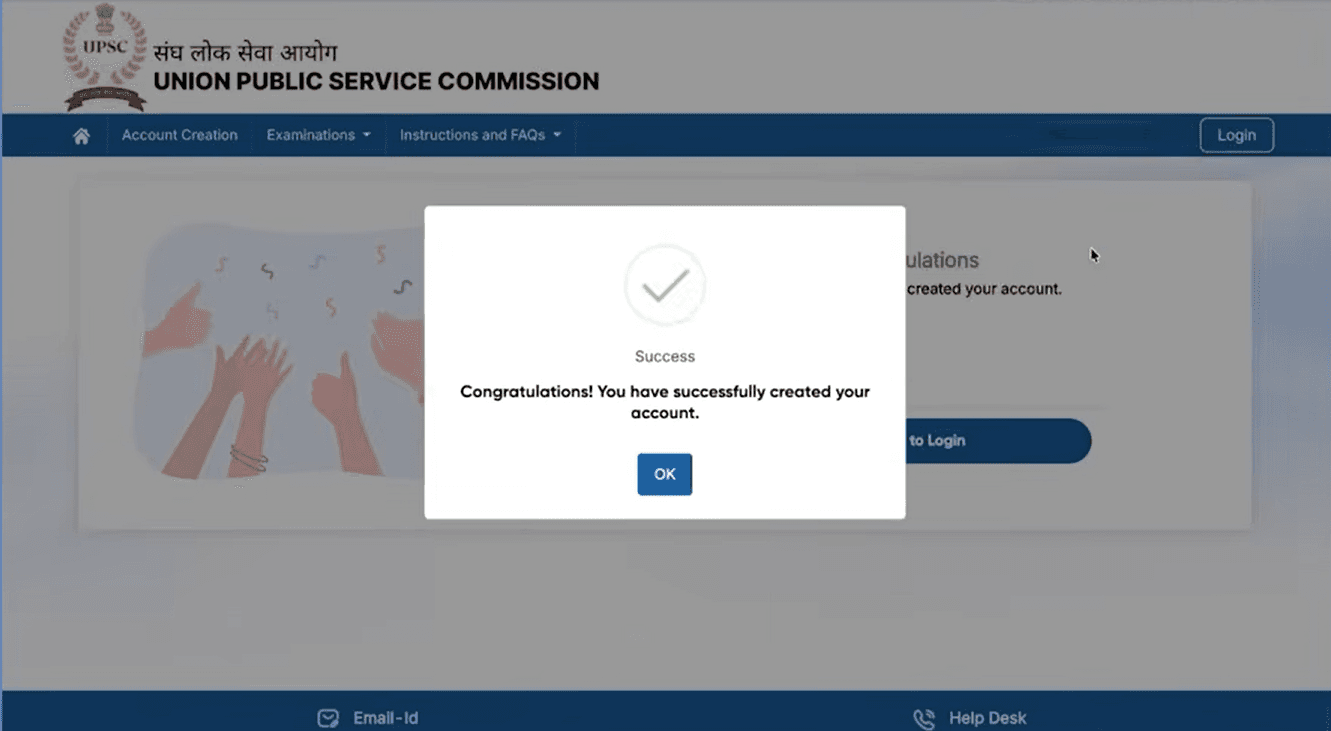
“Congratulations! You have successfully created your account.”
Click OK to proceed.
7: Login to UPSC Portal
You will be redirected to the Login page.
Log in using:
Registered Mobile Number & OTP, or
URN & Password, or
Email ID & Password (as available).
After login, you can proceed with filling UPSC examination forms.
Step 2: Login & Application Form
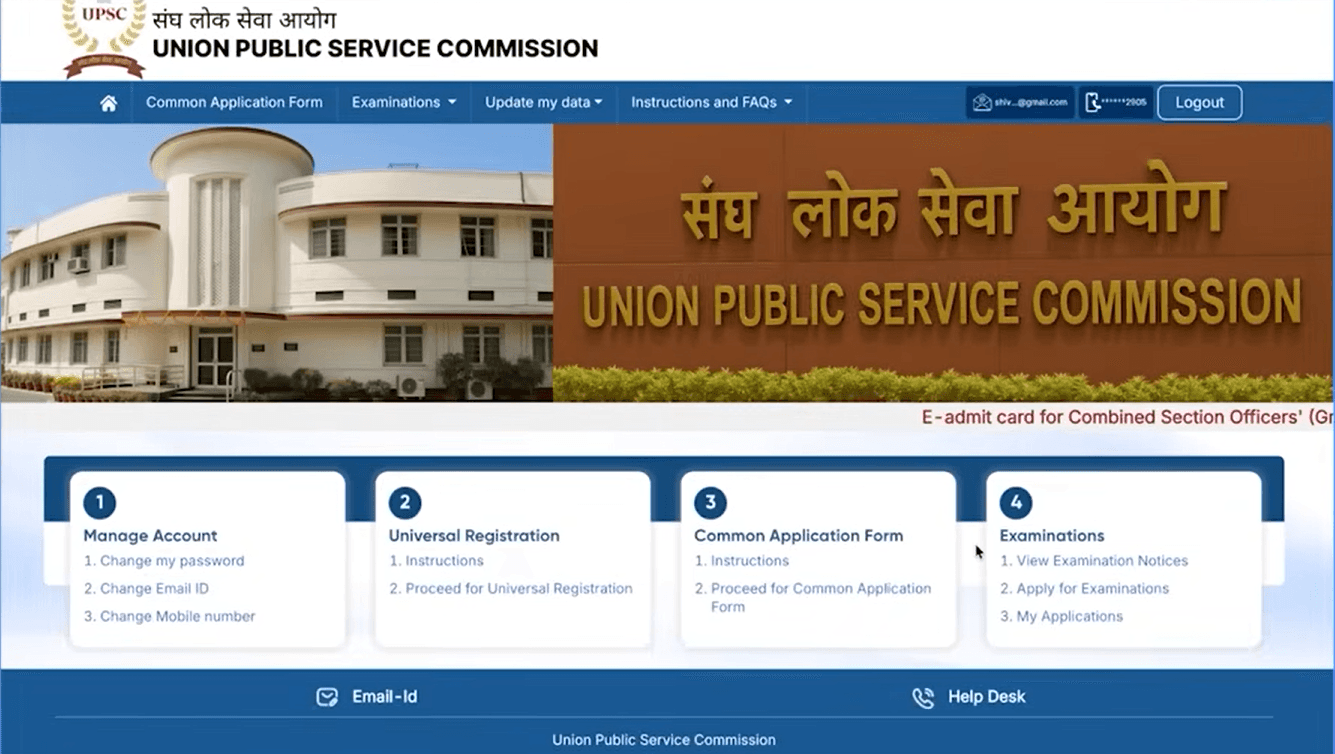
Login using OTR credentials
Fill personal, educational, and communication details carefully
Step 3: Upload Documents
Upload photograph, signature, and certificates in prescribed format
Step 4: Pay Application Fee
Pay fee using online or offline mode (if applicable)
Step 5: Final Submission
Review all details carefully
Submit the form
Download and save the confirmation page
Once submitted, date of birth and basic details cannot be changed.
Before filling out the form, ensure you meet the specific Vacancy Eligibility criteria for your preferred services.
Submit your UPSC form by 3rd February 2026 for CS(P) and IFoS(P) exams. The deadline might get extended, but don’t rely on it. Submit early and stay safe-don’t wait till the last day.
Download UPSC Calendar PDF
Don’t miss any important date! UPSC releases an official exam calendar with all key dates-from application deadlines to exam schedules.
Download the official UPSC Calendar PDF and keep it handy. It’s your complete roadmap for the entire exam process.
UPSC Exam Date 2026: Prelims & Mains Explained
UPSC Preliminary Examination 2026
Date: 24 May 2026
Papers:
General Studies Paper I
CSAT (Paper II – qualifying)
Nature: Screening test (marks not counted for final merit)
UPSC Mains Examination 2026
Start Date: 21 August 2026
Papers: 9 descriptive papers (Essay, GS I–IV, Optional)
Nature: Marks counted for final ranking
Only candidates who crack Prelims are eligible for Mains.
Check if you qualify for the Mains Paper A Indian Language Rules Exemption under the updated 2026 guidelines.
Common Mistakes to Avoid While Filling UPSC Form
Entering incorrect date of birth
Uploading blurred or outdated photograph
Using invalid category certificates
Waiting until the last date to apply
Not saving application confirmation
Avoiding these mistakes ensures a smooth application process.
Frequently asked question (FAQs)
When will they release the UPSC Application Form 2026?
What is the last date to apply for UPSC CSE 2026?
How do first-time candidates apply for the UPSC exam?
Can final-year graduation students apply for UPSC 2026?
What action does UPSC take if an applicant makes a mistake in the application form?
The UPSC application form 2026 is a critical step that determines your eligibility for the Civil Services Examination. Candidates should apply early, follow instructions carefully, and ensure accuracy in every detail.
A single mistake in the application can cost an entire year treat the form with the same seriousness as your preparation. Review the Answer Keys to understand the evolving exam difficulty. Post-selection resources such as the New Cadre Allocation Policy and the IAS Civil List are available for successful candidates.





No comments yet. Be the first to join the discussion!